We use cookies to improve the services we offer you. By continuing to browse this site, you consent to keep them in accordance with our Privacy Policy.
×We use cookies to improve the services we offer you. By continuing to browse this site, you consent to keep them in accordance with our Privacy Policy.
× 18,882
 6 min
6 min

Everyone’s found themselves in a situation like this: you decide to spend a pleasant evening in front of the screen, and your computer refuses to play your choice of a downloaded track, music video, or DVD movie. Most of the time, this happens because of an unsupported audio or video codec.
Don’t know what codecs are and how they work? This article is just for you! Read on to learn what codecs are for, what types of codecs exist, and how the video playback process works on PCs and mobile devices.

A Codec (short for “coder” and “decoder”) is a program for encoding (compressing) and decoding (playing back from a compressed state) multimedia data such as audio and video streams. Each codec is specific to a particular data type. Specialized audio codecs are required for processing sound recordings, and video codecs handle video. Both types are used in footage with video and audio tracks.
There are also codecs for processing digital images and text, but in this article we’ll focus on those for audio and video data.
Imagine you’ve recorded a short video on your camera, uploaded it to your computer, and opened it in a media player. Seems simple, right? But the media codecs inside your camera and computer had to do a lot of work to make it all happen. Let’s take a look at what these programs do when you record videos and play back the captured footage.
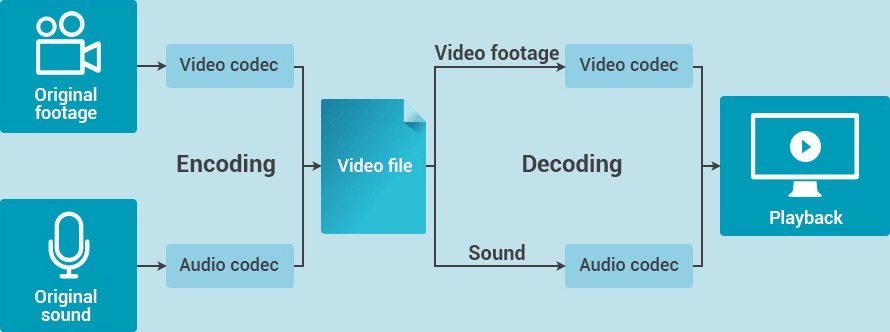
Codecs start working the moment you push the record button on your camera. While you’re shooting, a video codec compresses and encodes the video track, and an audio codec deals with the audio track. Then, both streams are synchronized and saved in one package – a media container or, in simpler terms, a format. Cameras can record in popular formats like AVI and MP4 as well as lesser-known ones.
Now, when you transfer the recorded clip to your computer, the codecs installed on the computer begin doing their job: the video codec decompresses the footage, the audio codec handles the audio track, and the media player sends this information to your computer’s display and speakers.
Can’t we do all this without encoding? Theoretically, yes; practically, not really. Codecs perform one very important function: reducing the file size so that the recordings can be played on the latest devices.
The video files that cameras create when recording are extremely large: a 5-minute clip shot on one of the latest smartphones can take several gigabytes of memory! Think about how much space there is on the disks in your computer and mobile devices, then imagine how many uncompressed video clips you could store on them – probably, not a whole lot.
It is possible that in the future, when all devices come with tons of terabytes of memory, codecs will no longer be needed. But for now there’s just no substitute for this convenient technology that turns multi-gigabyte videos into multi-megabyte ones.
Video and audio files are compressed thanks to the so-called data redundancy. How does this happen? Imagine you spent five minutes recording a seascape – like the one in the picture:

Let’s say your camera shoots at 30 fps. This means that it saves 30 unique images every second in memory. So in five minutes (300 seconds), it shoots 9,000 frames!
But realistically, what can drastically change in your landscape within one second? Will the sky turn green? Will the water evaporate?
Even if there are some changes, they will be smooth, not sudden. Consequently, your camera is shooting 30 almost-identical frames every second.
So why keep all these identical frames in their entirety in the camera’s memory? To record a landscape video, a codec has to save the original frame, find all the similar ones, and delete the repeated image elements. During playback, the codec just inserts the variable parts into the original image. If something else changes, the codec will identify another original frame and all its derivatives and repeat the process. This algorithm is called “motion compensation” and is one of the main ways video data are compressed.
Motion compensation is just one of the many actions taken by video codecs when processing camera recordings. Audio codecs use their own methods for removing redundant information. As a result of the codecs’ work, most redundant data are deleted from audio and video streams, enabling the size of the decoded file to be significantly reduced.
The latest codecs use advanced complex data compression algorithms that help to minimize information loss. However, if you don’t want to take the risk, we have good news: there are the so‑called “lossless codecs” that process video without losing anything. This means that, when a stream is being decoded, the information is restored with bit-by-bit precision. But be prepared – video files processed with such codecs will be quite large.