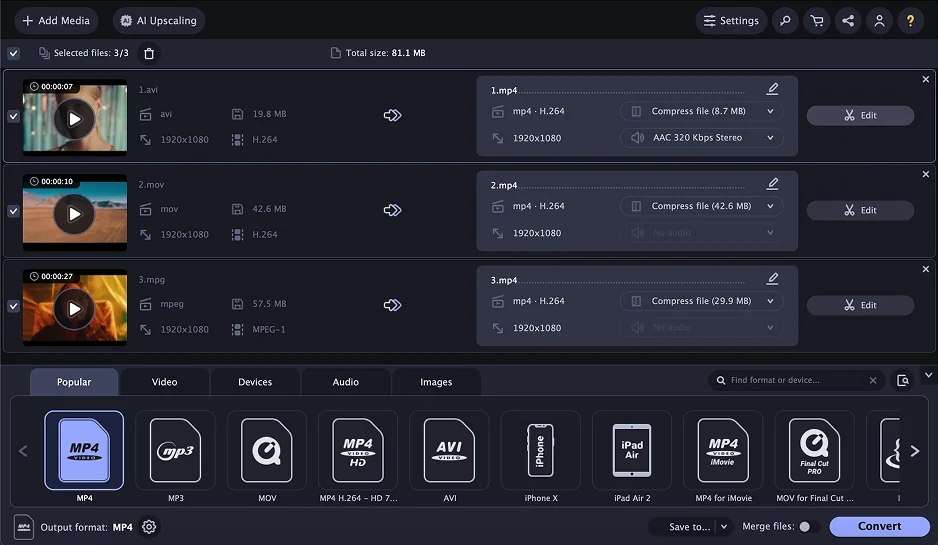
What’s new in Movavi Video Converter
Is your software up to date? Go to Settings → About to check which version of the program you are using. Update regularly to have access to newest features and improvements.
Please note: Users purchasing the lifetime license for Movavi Video Converter get access only to minor updates of the program. Users purchasing the annual subscription for Movavi Video Converter also get access to the next major update.
Version 24.4.0
December 1, 2025
- No major new features, just thoughtful polishes that speed up your workflow.
Version 24.3.0
March 10, 2025
- Fixed an issue with DVD conversion, ensuring smoother and more accurate conversion of DVD content to digital formats.
Version 24.2.0
October 14, 2024
- Minor improvements and bug fixes.
Version 24
MAJOR UPDATE
October 11, 2023
An important technical update is here!
You can get Movavi Video Converter 24 for free, if you have an activated version 23:
- Visit www.movavi.com and download the latest version.
- Install it on your computer.
- Enter your previous activation key to continue using the full version of the program.
If you have an older version of Movavi Video Converter, you’ll need to either buy the latest version of the program or keep using your current version.
Need help? Contact our Movavi Support Center anytime.
Version 23.1.0
July 24, 2023
- Minor improvements and bug fixes
Version 23.0.1
November 3, 2022
- Minor bug fixes and improvements
Version 23
BIG UPDATE
October 10, 2022
AI upscaling
- Give what you’ve shot this summer a serious facelift, making your vids’ resolution 8 times better. Treat your followers to more eye candy and show them – in every detail – how hot and sunny it all was!
Version 22.5.0
June 9, 2022
Minor bug fixes and improvements
Version 22.4.0
May 19, 2022
- AI Upscaling is now faster and even more useful! Now you can improve your videos and images by 4 times
- Minor bug fixes and improvements
Version 22.3.0
February 17, 2022
- You can select and extract subtitles again. Note that this feature is in the editing window now
- Minor bug fixes and improvements
Version 22.2.0
December 22, 2021
- Minor design changes to make the program even more pleasant to work with
- Minor bug fixes and improvements
Version 22.1.0
November 17, 2021
- Now the app supports Windows 11
- Minor bug fixes and improvements
Version 22
BIG UPDATE
October 14, 2021
AI quality upscaling
- Now you can improve video resolution without quality loss thanks to the new AI-powered feature
Version 21.5
August 19, 2021
- Minor bug fixes and improvements
Version 21.4
July 29, 2021
- The Crop and Rotate tools are now unified
- The Before/After feature in the Crop/Rotate tool is now even easier to use
- Conversion has become even faster
- Minor bug fixes and improvements
Version 21.3
May 27, 2021
- 2x acceleration of single file conversion when converting with other accelerations deactivated on systems with Windows and processors Intel® Core™ i5 and higher
- Minor bug fixes and improvements
Version 21.2
March 4, 2021
- Minor bug fixes and improvements
Version 21.1.0
December 15, 2020
- Minor bug fixes and improvements
Version 21
BIG UPDATE
October 21, 2020
- Timeline scaling
Now you can use the Scale scrollbar to expand or contract the Timeline scale for more precise positioning of the trimming marker - Still frame preview
Just hover the cursor anywhere on the Timeline to see a small still frame preview of your video file at that point - Time indication
Enter the exact time value you need inside a text box just below the trimming marker to ensure even more precise positioning - Undo/redo
The standard Undo/Redo functions are now available in the Trim tab – undo and redo any change with a single click - Easier file selection
Select only the files you need for batch conversion or compression, using the check boxes in the main window
Version 20.2
June 18, 2020
- Improved trim feature
Now you can cut your file into any number of parts and convert them all or one at a time. You can also save individual file segments after trimming the original - Exact size estimates for audio
See the exact size estimate of your output audio file even before conversion – just click on the file size in the program window
Version 20.1.0
February 19, 2020
- Ability to adjust the quality of audio files
- Minor bug fixes and improvements
Version 20
BIG UPDATE
October 21, 2019
- New design
Discover the familiar, simple interface redesigned to look cleaner, sleeker, and ready for 2020 - Online subtitle search
Now you can quickly find the subtitles you need and use them in your videos - Advanced subtitle editing
Use a wider set of editing tools to change the font, size, style, and color of the subtitles for your favorite movies and shows
Version 19.3.0
May 30, 2019
- Ability to read files in the HEIC/HEIF format
- Built-in tips that will help new users to get started faster with the app
- The problem with sound when opening files with the EAC3 codec is now fixed
- Other bug fixes and improvements
Version 19.2.0
April 4, 2019
- The app window now automatically adjusts to 720p and lower-resolution screens
- You can adjust the quality of your files when converting them to the JPG format
- An enhanced trimming tool: set the exact time frame of the desired segment, trim away even fractions of a second with new markers
- Minor bug fixes and improvements
Version 19.1
February 20, 2019
- When adding multiple files, a progress bar now appears with the number of files left to upload to the program
- Minor bug fixes and improvements
Version 19.0.2
December 12, 2018
- Minor bug fixes and improvements
Version 19.0.1
November 7, 2018
Minor bug fixes and improvements
Version 19.0
BIG UPDATE
October 25, 2018
- New options for hardware acceleration are now available for owners of systems with AMD® and NVIDIA® graphics cards
- A new tab in the editing window: you can choose from a built-in library of creative filters and apply them to the video you want to convert
- A new bitrate option: select presets with a variable bitrate (VBR) to reduce the file size after conversion even more – by up to 20–40%
- A new button in the Trim tab that lets you do trimming without converting your file
- A new feature in the Rotate tab to help you rotate your clips without converting them to another format
- Now you can apply the desired subtitles, audio track, or bitrate to all your videos in just one click
Version 18.4
July 2, 2018
- Minor bug fixes and improvements
Version 18.3.1
May 17, 2018
- Minor changes
Version 18.3
April 2, 2018
- All popular RAW formats (CR2, NEF, RW2, and many others)
- Ability to save embedded subtitles as an individual file
- Other minor changes
Version 18.2
March 7, 2018
- A new Convert Sample feature: convert a short fragment of a file to check the conversion quality
- Other minor changes
Version 18.1.2
February 9, 2018
Minor changes
Version 18.1.1
January 25, 2018
- Minor bug fixes and improvements
- New codec CineForm added
Version 18.1
November 13, 2017
- Minor bug fixes and improvements
Version 18.0
BIG UPDATE
October 23, 2017
- Support for H.265 codec when converting to MP4 and MKV formats on systems with an Intel® or NVIDIA® graphics card with HEVC technology support
- Converting into M4V, MXF, ASF, M4R, M4B, AIFF, AU, MKA, F4A, and AC3 (the latter is available on Windows 8 and higher)
- Ready-made presets for new devices: iPad Pro 9.7, 10.5, and 12.9; Samsung Galaxy S8 and S8+, LG G6; Sony Xperia X and XZ; Huawei Honor 9; a special “Ringtone for iPhone” preset
- Presets for Instagram; presets for YouTube and Vimeo with higher resolutions; more presets for 4K Ultra HD video
- You can merge files instantly in the SuperSpeed mode, without re-encoding and loss of quality
- You can save multiple subtitle tracks; external subtitles stored in a folder along with your movie are automatically added to the converted file
- Now you can apply the “No audio” option to all video files in the list – can be very helpful if you shoot a lot on an action cam
- The structure of folders now remains unchanged after conversion
Version 17.3.0
July 13, 2017
- Support for videos compressed with H.265 on Windows 8 and earlier
- Minor bug fixes and improvements
Version 17.2.1
March 16, 2017
- Minor bug fixes and improvements
Version 17.2.0
December 14, 2016
- Now available in Traditional Chinese
- Minor bug fixes and improvements
Version 17.1.0
November 28, 2016
- Minor bug fixes and improvements
Version 17.0.3
October 25, 2016
Minor bug fixes and improvements
Version 17.0.2
October 13, 2016
Minor bug fixes and improvements
Version 17.0.1
October 6, 2016
Minor bug fixes and improvements
Version 17.0
BIG UPDATE
October 3, 2016
- Device detection. Just connect your device to the computer, and the program will suggest the appropriate preset
- Easily remove multiple segments from any part of a video file with frame-by-frame precision
- Automatic volume level assessment and adjustment recommendations
- Make videos shot in poor lighting conditions clearer by eliminating visual noise; remove unwanted background noises in audio
- H.265 codec support for Windows 10
- AC3 codec support for Windows 8 and later versions
- 20+ new video and audio codecs
- Presets for over 25 recently released devices from Apple, Samsung, Sony, LG, Huawei, Xiaomi, and others
- Entirely new, sleek interface
- Enhanced footage stabilization thanks to a better algorithm
- More options for subtitles. Sync them with video; position them vertically if needed
- Multichannel support for the AAC codec
- 2x accelerated NVENC conversion
- Accelerated VP8 and VP9 codec conversion – up to 2.7 and 3.5 times faster, respectively
Version 16.2.0
February 24, 2016
- Added Chinese and Korean interface languages
- Minor bug fixes
Version 16.1.0
December 14, 2015
- Minor bug fixes and improvements
Version 16.0.2
October 23, 2015
Minor bug fixes and improvements
Version 16.0.1
October 7, 2015
- Minor bug fixes
Version 16.0
BIG UPDATE
October 2, 2015
- Support for NVIDIA NVENC hardware acceleration
- Support for more formats and codecs: APNG, Opus, and more
- Ready-made presets for the latest mobile devices: Samsung Galaxy S6, S6 Edge, and Grand Prime, iPhone 6s and 6s Plus, Google Nexus 6, Motorola Moto G and Moto X, Sony Xperia Z3 and Z3 Compact, HTC One (M9), LG G4 and G Flex 2, Nook Tablet
- Watch Folder. Specify a folder and all the new files in that folder will be automatically converted to the format of your choice
- Video stabilization lets you eliminate jitter from footage – very helpful when processing amateur video
- Two-pass encoding. If you want optimal balance between the quality and size of the output video file, enable this option in the preset settings
- Save individual frames from any video with a single mouse click
- Improved optimization for multi-core processors delivers an additional performance gain of up to 20%
- Minor functional and interface improvements
Version 15.3.0
July 28, 2015
- Compatibility with Windows 10
- Minor bug fixes and improvements
Version 15.2.3
April 29, 2015
- Improved processing quality for high-resolution and fast-FPS videos
- Minor bug fixes and improvements
Version 15.2.2
March 25, 2015
- Minor bug fixes
Version 15.2.1
February 19, 2015
- Fixed the issue with export to iTunes 12
Version 15.2.0
December 22, 2015
- Conversion to MOV with MJPEG codec – this format is often used for uploading video to stock websites
- Option for parallel CPU and NVIDIA CUDA GPU conversion
- Other improvements and bug fixes
Version 15.1.0
October 22, 2015
Ability to set automatic computer shut down after conversion
New preset for iPhone 6 Plus
Conversion to MKV with VP9 codec
Major bug fixes
Various improvements
Version 15.0
BIG UPDATE
August 7, 2015
- New editing features
The new version of Movavi Video Converter offers even more opportunities to edit and improve your video before conversion. You can flip video horizontally or vertically, manually choose crop areas, improve the quality using automatic filters, and overlay text and image watermarks. - Extra options for working with sound
If the sound level in your movie is too low or too high, you can easily fix it: just set the desired volume level before starting the conversion. If your clip has big differences in volume, e.g. very loud music and quiet speech, the new volume normalization feature will come in handy. Note that you can change the sound volume in SuperSpeed mode without re-encoding the video track, and, as a result, almost instantly and without loss of image quality. In earlier versions, when converting video with multiple audio tracks, you could only transfer one track to the converted file; now, you can transfer up to 16 tracks (depending on the format you choose). You can transfer audio tracks in SuperSpeed mode without re-converting the video track as well. This feature will be a boon for those using video to study foreign languages. - Working with images
Movavi Video Converter now supports image file conversion. You can convert images in many popular formats into GIF, JPEG, BMP, TIFF, and PNG. In addition, you can now convert images to video! Still pictures are transformed into 5-second video fragments as if by magic. You can also join images together, including with video clips. - Converting video to GIF
Аnimated GIFs are getting more and more popular on the web. Using Movavi Video Converter 15, you can create your own GIF animations from video clips: you can choose between a number of ready-made presets with different image sizes. - Improved support for 4K Ultra HD video
Now you can not only convert 4K Ultra HD files to a lower resolution, but also convert 4K video from one format to another. - Support for more formats and codecs
We’ve implemented conversion to M4A audio format with AAC and ALAC codecs. For WebM format video, we’ve also added support for new codecs: VP7 and VP9 – for reading, and VP9 – for writing. - HTML5 presets
If you often post videos on your website or blog, you’ve probably heard about HTML5. The challenge with this standard is that you need to upload video in three different formats to your server because different browsers use different formats. In the new “HTML5 Video” preset group, you will find presets for MP4 (H.264), WebM, and OGV formats. - Presets for upscaling video
If you want to watch your family videos on a big screen, you may be disappointed. Old recordings often have relatively low resolution, while modern TVs and monitors support video resolution up to 4K Ultra HD. The device you play the video on will resize the image appropriately, but the quality of the image will likely suffer. To avoid these problems, you can convert your video to a higher resolution using special presets in the latest version of Movavi Video Converter. Thanks to optimally chosen resizing algorithms, the video quality may even improve. - New presets for mobile devices
We are constantly updating the list of supported devices and adding ready-made presets for the latest models. In v15, you will find presets for iPhone 6, Samsung Galaxy S5 and Note Pro, HTC One mini 2, LG G3, Nokia Lumia 1520, Sony Xperia Z2, new consoles – PS4 and Xbox One – and many other devices. We’ve also added presets for Lenovo smartphones and tablets, as well as for popular brands of TVs. - Extra optimization and greater usability
Now you can minimize the video converter to the system tray. This reduces the CPU load so that you can continue working in other programs while the conversion is in progress. Additionally, you can always pause the conversion if you need to complete a resource-heavy task and then resume it once the task is complete. - Other improvements
When converting video and audio, meta data (artists, date of shooting, etc.) is automatically transferred from the original to the converted file. We’ve also added the ability to choose the encoding when adding subtitles. This can help to avoid problems when adding subtitles with encoding that is different from the system encoding.


1.5M+ users already subscribed to our newsletter