Get the new Movavi Video Editor 2027
Meet the headliner – Movavi Templates. Take one as-is, or change it however you like. Enjoy a brand-new way to create videos!
- Video templates: not the usual ones – made of Blocks
- Blocks: pre-edited video parts you can move and adjust
- Plus: fresh AI tools to polish your videos
Dont’t forget to use the vlogger promo code for the annual subscription!
Get the new Movavi Video Editor 2027
Meet the headliner – Movavi Templates. Take one as-is, or change it however you like. Enjoy a brand-new way to create videos!
- Video templates: not the usual ones – made of Blocks
- Blocks: pre-edited video parts you can move and adjust
- Plus: fresh AI tools to polish your videos
Dont’t forget to use the vlogger promo code for the annual subscription!
Create videos in a new way
Easily find the perfect template
We’ve organized everything into neat categories so you can easily grab a fully designed template for whatever you're making – vlogs, promos, travel recaps, you name it. Choose a style you like and start making it your own instantly.
Add your clips and watch them glow up
Swap out the sample footage and replace it with your own in a snap. Drop in your raw clips and see just how easy it is to give them that awesome pro look!
Adjust anything on the fly
Want to make it totally your vibe? Rearrange the Blocks however you want – drop them at the start, middle, or end of your video. Then swap in the text and make every word count, in style.
Build any video faster with pre-edited Blocks
No need to design from scratch anymore. Combine intros, transitions, and dynamic cuts like modular building blocks to assemble any type of video effortlessly.
Get Movavi Video Editor 2027
Video Editor
1-month subscription
$19.95
No watermark
No cap on video or audio length
Free minor and major updates throughout the subscription period
Basic editing tools
- Video editing (cutting, cropping, rotating, color adjustments, video speed)
- Audio editing (audio recording, beat detection, synchronization)
One-click AI tools
- Automatic subtitles in almost any language
- Quick background removal
- Powerful noise reduction
- Precise motion tracking
Basic effects
Customizable video templates
Customizable video templates for any vibe – with ready-made edits, transitions, text styles, and music.
Auto-tracked cropping
Crop videos while keeping the speaker or product centered automatically. The tool follows your main subject, adjusting the frame on-the-go. Ideal for turning horizontal clips vertical while the subject remains the center of attention.
Word-by-word subtitle highlighting
Add active word highlighting to your subtitles for that popular karaoke-style effect. The tool tracks each spoken word automatically for a stylish blogger vibe. Now your viewers will never miss a word – literally!
Quick video denoise
Clean up graininess in no time. Our AI removes visual noise without blurring faces or important details – ideal for low-light clips, mobile footage, old videos, or greenscreens where sharp edges count. Your footage will clean up nicely!
Pre-timeline trimming
Trim your clips before they hit the timeline. Keep just the parts you need – no bloated projects, no endless scrubbing, just the footage you'll actually use. Straight to the point – and straight to editing.
Video Editor Plus
1-year subscription
$155.95
55% off$69.95
No watermark
No cap on video or audio length
Free minor and major updates throughout the subscription period
Basic editing tools
- Video editing (cutting, cropping, rotating, color adjustments, video speed)
- Audio editing (audio recording, beat detection, synchronization)
One-click AI tools
- Automatic subtitles in almost any language
- Quick background removal
- Powerful noise reduction
- Precise motion tracking
Basic effects
Customizable video templates
Customizable video templates for any vibe – with ready-made edits, transitions, text styles, and music.
Auto-tracked cropping
Crop videos while keeping the speaker or product centered automatically. The tool follows your main subject, adjusting the frame on-the-go. Ideal for turning horizontal clips vertical while the subject remains the center of attention.
Word-by-word subtitle highlighting
Add active word highlighting to your subtitles for that popular karaoke-style effect. The tool tracks each spoken word automatically for a stylish blogger vibe. Now your viewers will never miss a word – literally!
Quick video denoise
Clean up graininess in no time. Our AI removes visual noise without blurring faces or important details – ideal for low-light clips, mobile footage, old videos, or greenscreens where sharp edges count. Your footage will clean up nicely!
Pre-timeline trimming
Trim your clips before they hit the timeline. Keep just the parts you need – no bloated projects, no endless scrubbing, just the footage you'll actually use. Straight to the point – and straight to editing.
Plus: 3 effects packs for a quick start
- Enticing gradients
- Cinematic effects and dramatic LUTs
- Vintage VHS effects
Discover templates for any vibe
Vlogs and social content
Whether it’s a daily vlog, travel recap, gaming clip, or cooking video, we’ve got a template styled and ready to go. Put together on-point clips in minutes and keep your content looking pro.
Family movies
Forget editing birthday celebrations, weddings, or holiday recaps from scratch. Pick a template, drop in your clips and photos, and get a video complete with synced music – no skills needed. Your loved ones will adore it!
Business and promos
Get a ready-made foundation for your next presentation, ad, or promo video. Customizing text, colors, and logo takes seconds and you get a sleek, professional video ready for your team, prospects, or clients.
Tutorials and lessons
Skip setting up picture-in-picture and transitions by hand. Choose a structured template, drop in your material, and get a clear, engaging lesson without all the hard work.
See what else is new in this update
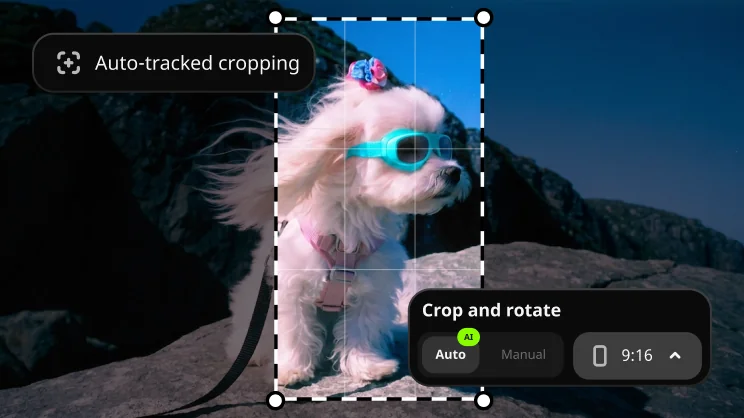
Auto-tracked cropping
Crop videos while keeping the speaker or product centered automatically. The tool follows your main subject, adjusting the frame on-the-go. Ideal for turning horizontal clips vertical while the subject remains the center of attention.
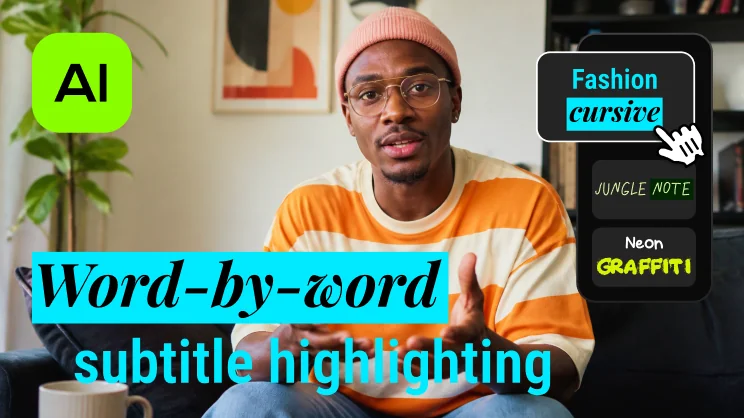
Word-by-word subtitle highlighting
Add active word highlighting to your subtitles for that popular karaoke-style effect. The tool tracks each spoken word automatically for a stylish blogger vibe. Now your viewers will never miss a word – literally!
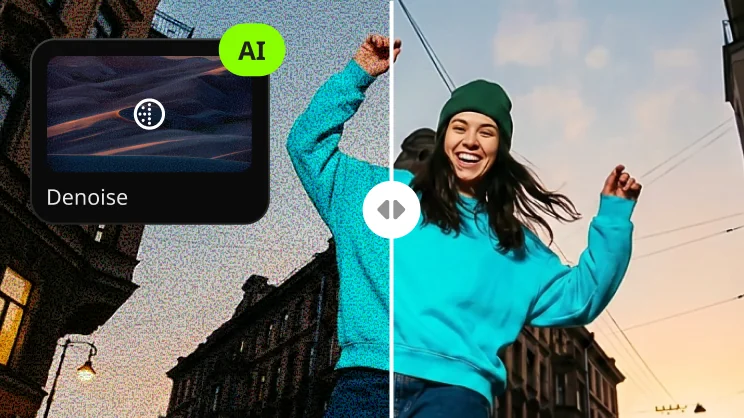
Quick video denoise
Clean up graininess in no time. Our AI removes visual noise without blurring faces or important details – ideal for low-light clips, mobile footage, old videos, or greenscreens where sharp edges count. Your footage will clean up nicely!
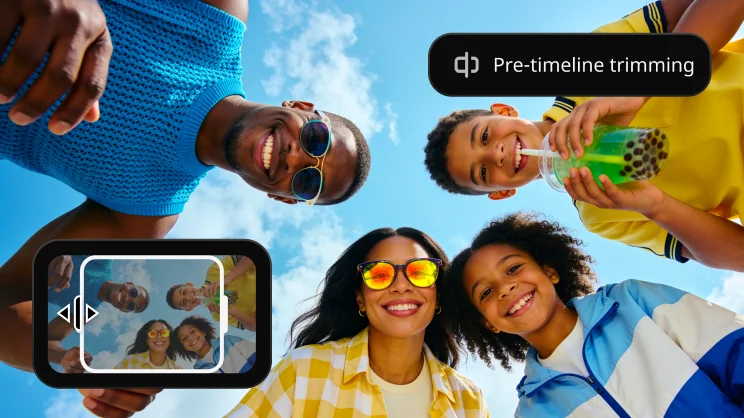
Pre-timeline trimming
Trim your clips before they hit the timeline. Keep just the parts you need – no bloated projects, no endless scrubbing, just the footage you'll actually use. Straight to the point – and straight to editing.
Get all the subscription perks
With an active subscription to Movavi Video Editor, you’ll always have the newest version plus all the fresh tools – no extra cost. Join today and keep an eye out for exciting features in upcoming updates.
Get all the subscription perks
With an active subscription to Movavi Video Editor, you’ll always have the newest version plus all the fresh tools – no extra cost. Join today and keep an eye out for exciting features in upcoming updates.