Step 1. Add your video files
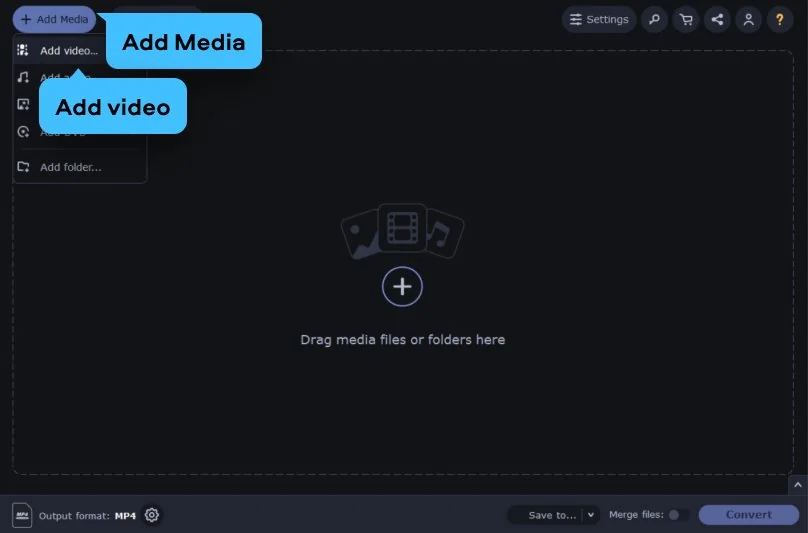
Open the app and click Add Media, then choose Add video. This video converter lets you pick one clip or many at once. This is perfect if you need to perform batch video conversion to save yourself some time.
This online converter handles small clips right in your browser. For large HD files, try Movavi Video Converter. It runs on your Windows or Mac, converts to iPad-friendly formats with no size limits – so even a big file is ready in minutes.
If you own an iPad and want to watch your own videos on it, the file just needs to be in a format the tablet supports. Movavi's online converter makes that simple: pick the ready-made iPad preset, or just convert to MP4 by default, and your video is ready to play. Here's how to do it:
3G2, 3GP, ASF, AVI, DVD (NTSC), DVD (PAL), FLV, M1V, M2T, M2TS, M2V, M4V, MJPEG, MKV, MOV, MP4, MPEG, MPEG-TS, MPG, MTS, MXF, OGV, SWF, TOD, TS, VOB, WebM, WMV, WTV
If your video won't play on your iPad – usually an unsupported codec or a file that's simply too large – converting it fixes the problem. Movavi Video Converter outputs to iPad-compatible MP4 (H.264), adjusted to the right resolution for your device, so the file plays smoothly without eating up storage. Here's how to convert it:
Open the app and click Add Media, then choose Add video. This video converter lets you pick one clip or many at once. This is perfect if you need to perform batch video conversion to save yourself some time.
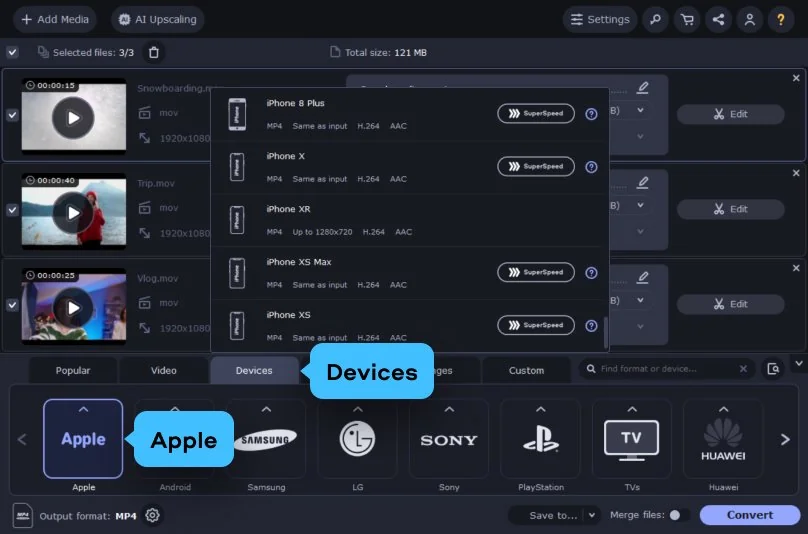
Open the Devices tab at the bottom, click Apple, and select your iPad format from the presets.
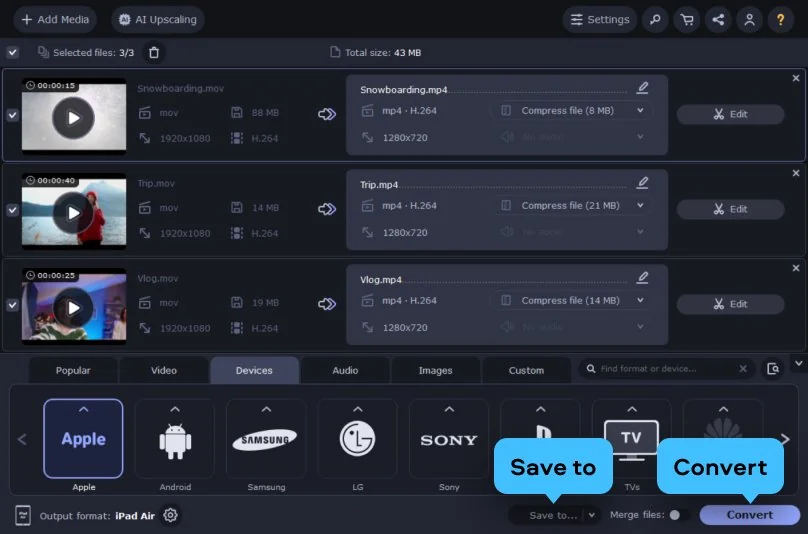
Click the Save to button to choose your destination folder, then simply hit Convert.
3GP, 3G2, 3GP2, 3G2P, 3GPP, ASF, AVCHD, AVI, DivX, DVD, FLV, F4V, M2TS, TS, MTS, M2S, M2T, MKV, MKM, MOV, QT, MP4, M4V, MPG, MPEG, MPE, M2P, M1V, M2V, VOB, DAT, MOD, TOD, VRO, IFO, MXF, OGG, OGV, OGM, RM, RMVB, RAM, RAX, RMX, SWF, WebM, WMV, WTV, AMV, AV1, AVS, BIK, BNK, CAVS, CDG, DPG, DV1394, DVR-MS, EA, FFM, FILM, FILM_CPK, FLC, FLI, FLM, FLT, FLX, GXF, H.261, IVR, MJ2, ML20, MPEG-3, MTV, MVI, MXG, NC, NSV, NUT, NUV, R3D, REC, RVA, RMS, RPL, RTSP, SDP, SMK, SXA, THD, THP, TRP, VFW, WM, WMVHD, WPG
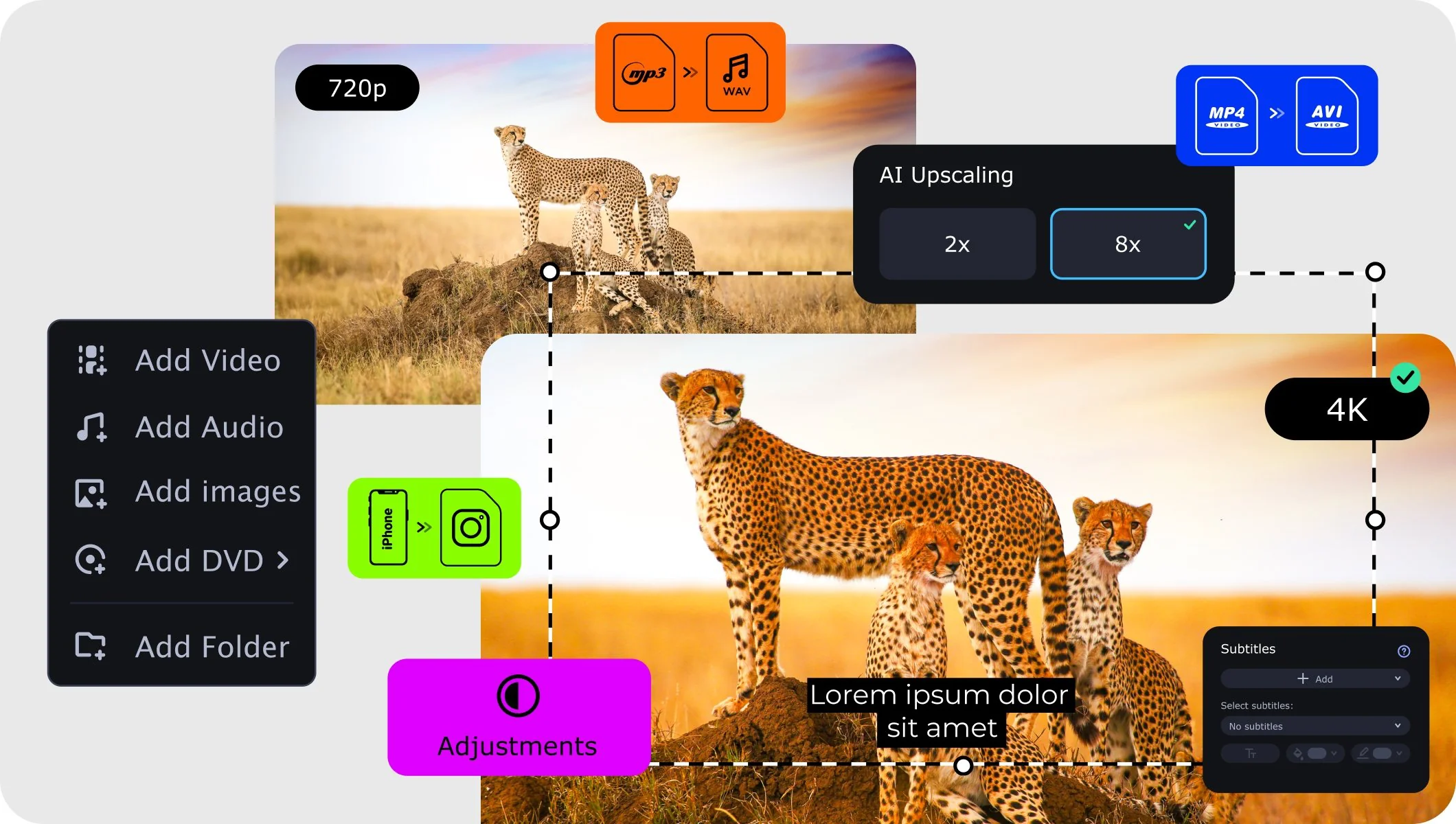
We’re the #1 choice for millions of people from all around the world. Join our thriving community and create stunning content with incredible ease.
Millions


The easiest way is to use a dedicated iPad video converter like Movavi Video Converter. Just add your file, pick an iPad-ready preset (or an output format like MP4 or MOV), and click Convert – the program handles the codecs and settings for you, so your clips play smoothly on any iPad, including iPad mini. Movavi has ready-made presets for all popular Apple devices, including iPad, which means you don't have to know the technical details to get a compatible file. If you'd rather not install anything, you can also use a free iPad video converter online to change the format straight from your browser.
You can download and try Movavi Video Converter for free. The trial lets you take the program for a test-drive and see whether it fits your needs before you decide to buy the full version.
No. Movavi's SuperSpeed mode converts files with zero quality loss. When your video already uses H.264 or MPEG-4 codecs, the converter simply rewraps it into an iPad-friendly container, so the result looks just as sharp as the original – even for Full HD and 4K footage.
Plenty. Movavi Video Converter supports 180+ media formats, including Full HD and 4K Ultra HD video. On the video side you can work with MP4, MOV, AVI, MKV, WMV, FLV, MPEG, M4V, and many more, plus audio formats like MP3, WAV, AAC, FLAC, and M4A, and even image formats. For iPad playback, MP4 with H.264 is the go-to choice.
Yes. The iPad video converter is available for both Windows and Mac platforms. The steps are the same on each: add your media, choose an Apple preset, and convert. Prefer not to install software at all? The online iPad video converter works right in your browser on either system.
Need more tools?
Bring your creative ideas to life with Movavi Video Converter – the all-in-one program.


1.5M+ users already subscribed to our newsletter