
Step 1. Install Movavi’s DVD Converter
Download Movavi Video Converter, open the file, and install the software on your PC or Mac.
Back in the early 2000s, I was the guy with a shoebox full of scratched DVDs, trying to convince my friends that my “director’s cut” copies were worth sitting through. Fast-forward to now, and those same discs are basically coasters unless you’ve got the right software. That’s where DVD converters come in – they can turn clunky old discs into sleek digital files you can actually use.
Over the past couple of weeks, I put several different converters through their paces. Some were smooth as butter, others felt like relics from the dial-up era, but every single one had its quirks. After plenty of late nights and a few botched exports (including one movie that somehow wound up in grayscale – my bad), I’ve pulled together a list of the best apps worth your time. Whether you want speed, control, or just something dead simple, you’ll find a pick here that fits.
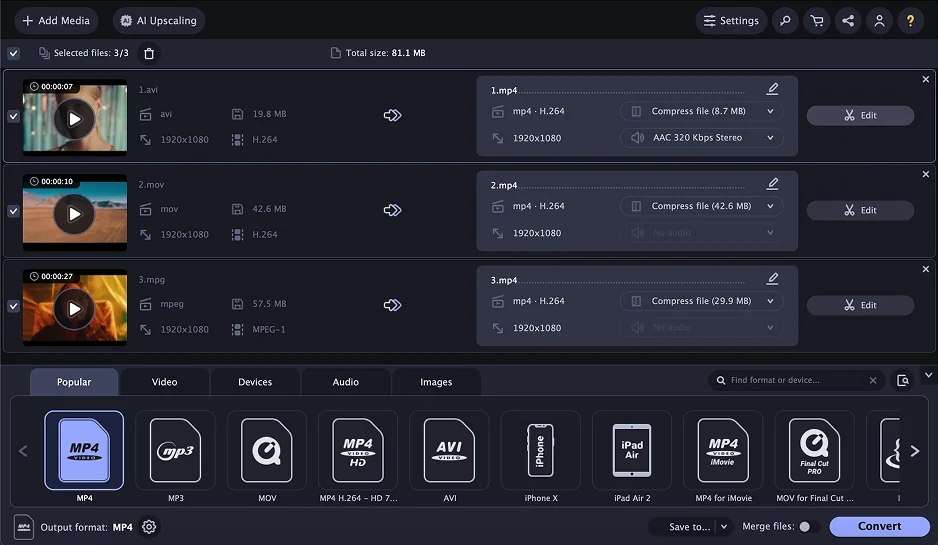
Why I picked it: It felt like the most polished option – fast, easy, and with useful extra tools
OS: Windows, Mac
Like Free DVD Video Converter, Movavi Video Converter is a part of a larger suite of products. This time, instead of various uploaders and downloaders, the software suite focuses on creating video and other media projects. Movavi Video Converter simplifies the conversion process thanks to its ready-to-use presets and compression feature. You can also tweak the conversion settings manually, which allows you to get the exact result you are hoping to get. I tried this with some older, grainy footage, and I was honestly surprised at how much cleaner it looked. I also liked that I could just stick to presets when I didn’t feel like fiddling with the details, but the manual options gave me plenty of control when I wanted it. Movavi Video Converter also boasts its AI-powered upscaling feature that can help you improve the quality of your videos significantly.
Beginner-friendly interface
Ready-to-use presets
AI upscaling feature
Compression tool
Powerful customization features for adequate control over the output
Can’t convert via URL
Free trial is limited to 7 days, then you have to purchase the program
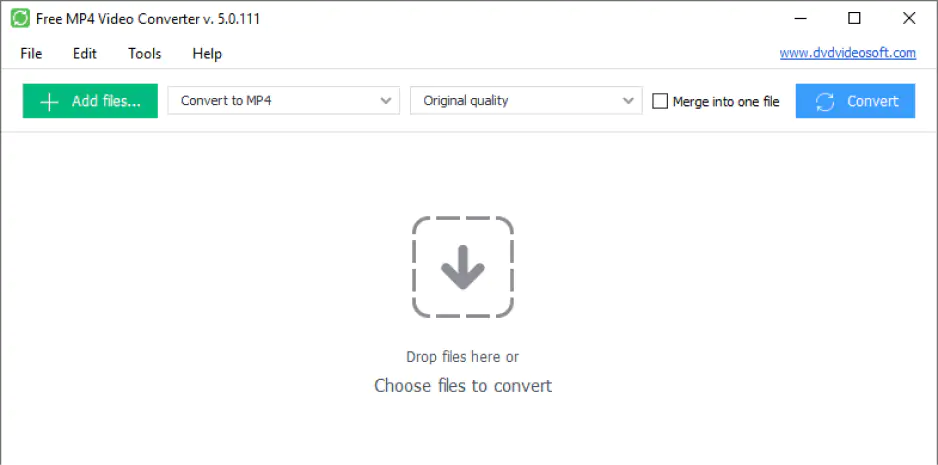
Why I picked it: I liked how simple it was – a couple clicks and I was done
OS: Windows
Free DVD Video Converter is a part of a larger suite of free programs called Free Studio by DVD Video Soft. It is a very simple program that will be easy for anyone to use. Converting a DVD is as simple as selecting your DVD drive from a dropdown list, selecting an output location and preset, and pressing the Convert button. Even among free DVD conversion software, the program is lacking in features, however. Part of the reason the interface is so simple to understand is that you don't have many options to customize your output. For very basic needs, this program is worth a try. Users may find they outgrow it quickly, though. Other products in Free Studio include various video downloaders, uploaders, and other converters. All products are highly specialized and downloaded individually, so Free DVD Video Converter is a small download. When I tested it, I liked how quickly I could get started, but I did feel a bit boxed in – after a couple of conversions, I already wanted more options than it gave me.
Small download size
Easy-to-use interface
No advanced customization features
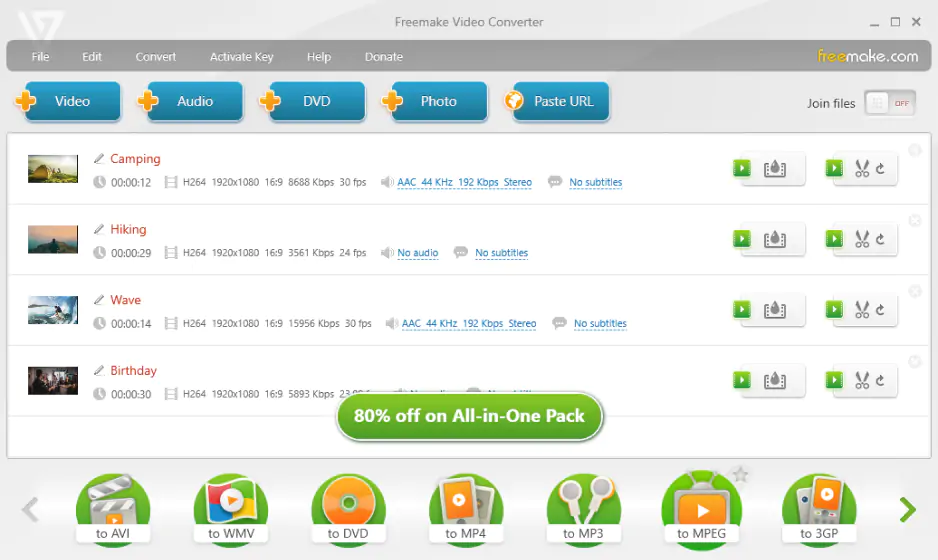
Why I picked it: It stood out because I could trim, add subs, and even burn DVDs without juggling other apps
OS: Windows
Freemake is the next free DVD conversion software on our list. This software has some features that aren't in some of the other products we'll look at today. For example, the software lets you trim videos and add subtitles. It even has built-in uploaders and downloaders for YouTube and other popular video sites. Another feature of Freemake, a DVD burner, allows you to not only convert video from DVD but convert it to DVD as well. It even allows you to create your own DVD menu, making it a good solution to burn DVDs and an excellent all-around video conversion product. I liked how it felt more like an all-in-one tool – being able to trim and add subtitles without jumping into another app made things much easier for me. The downside? The free version’s watermark was a little annoying.
Has essential video-editing tools
Includes a DVD encoder and burner
Like in many free programs, the conversion speed is relatively slow
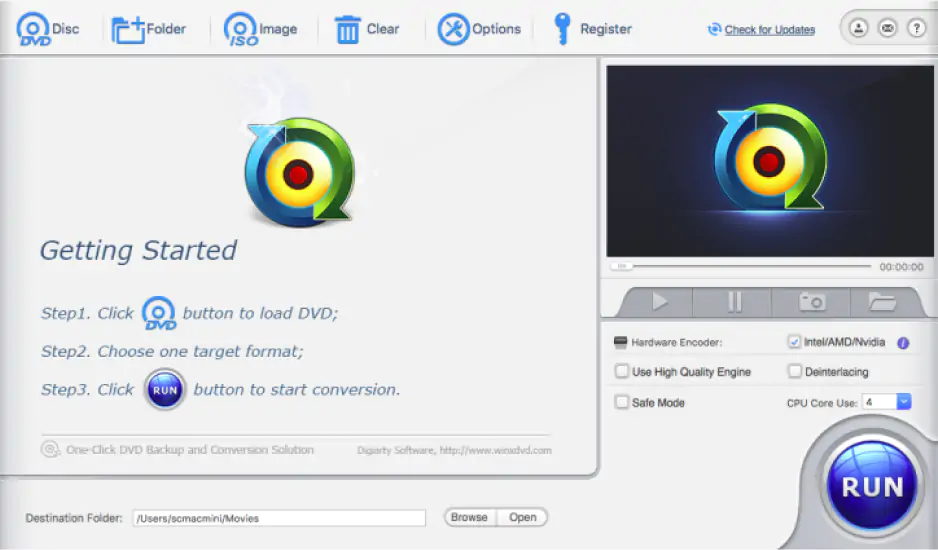
Why I picked it: It blew me away with how fast it chewed through even scratched discs
OS: Windows, Mac
WinX DVD Ripper has over 80 million users and has been around for over 19 years. It’s easily one of the most popular DVD ripping programs available today. The software can convert DVD files into viewable formats on any number of devices. It features acceleration technology that helps to quickly convert DVDs with ease. You can even try it with scratched or damaged DVDs as the Platinum version has some code to help read and fill in the blanks. This is one of the best DVD converters you can buy. When I threw a scratched old concert DVD at it, I didn’t expect much – but it handled it better than I thought. I liked that it didn’t choke on big files either, which made it feel really dependable.
Very fast conversions with acceleration tech
High-quality conversions
Has some editing options
The free version limits you to 5 minutes of conversion
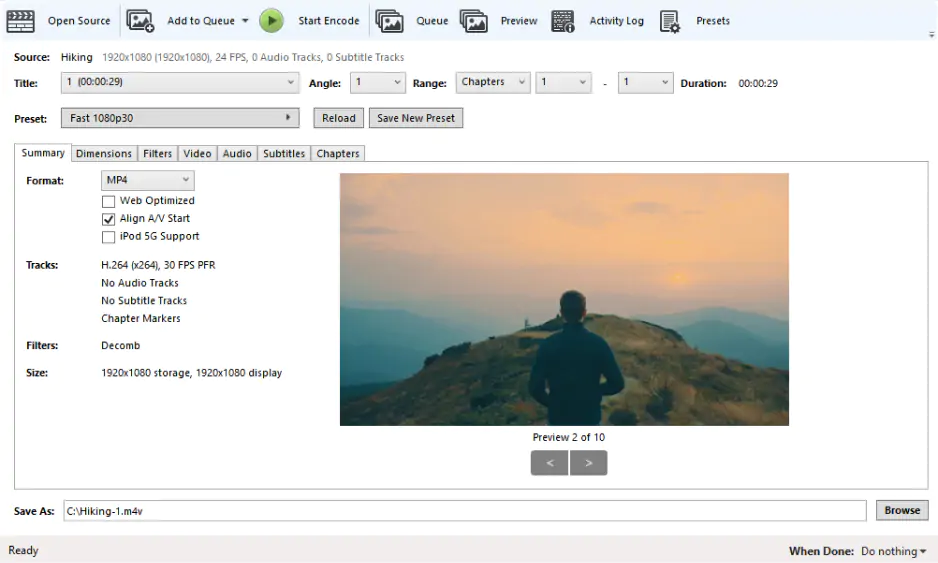
Why I picked it: Once I got over the clunky menus, I loved how much control it gave me
OS: Windows, Mac, Linux
While Handbrake has focused more on its core video conversion functionality in recent years, it was initially created for ripping DVDs and has long been the go-to choice for users looking for a quality free DVD converter. The program has plenty of presets to help you get your settings tuned in quickly, or you can take manual control over many different options. The program doesn't hold your hand while you are navigating through these settings, though, so be sure to understand the basics of how video formats work before you start trying to customize presets. Buried in the user interface, you'll find the option to apply basic video filters, such as deinterlacing and denoising, to the output. Because it was designed with DVDs in mind, you get great features like the ability to extract subtitles and chapters as well. I liked the level of control here, but I’ll be honest: the interface took me a while to get used to. Once I figured it out, though, the filters and subtitle extraction really felt like bonuses you don’t always get for free.
Filters for enhancing the video
DVD-specific features
Outdated and cluttered interface
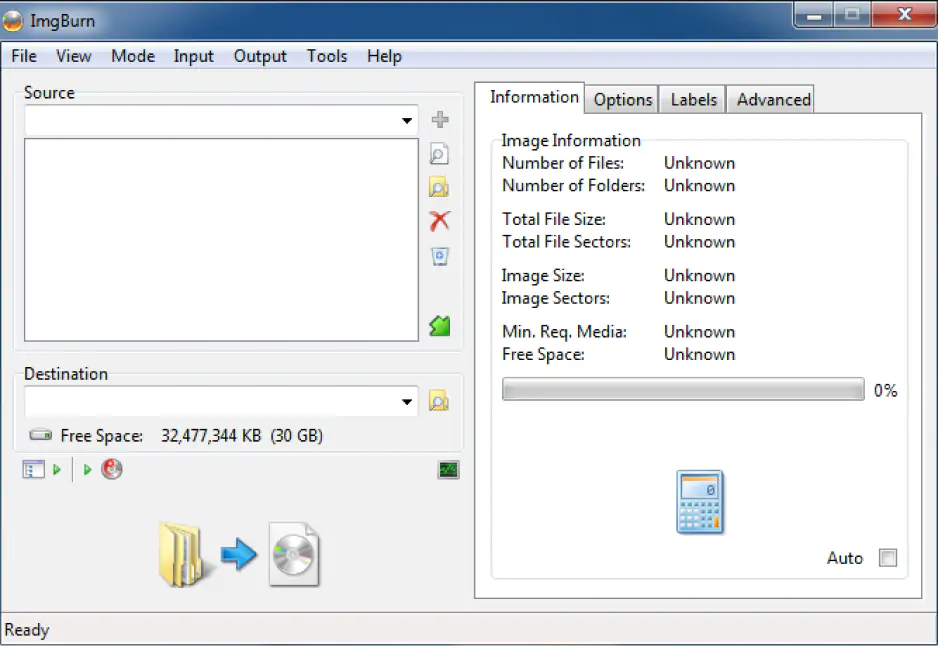
Why I picked it: It made backing up DVDs into clean ISO files surprisingly painless
OS: Windows
Another free video to DVD converter and burner is ImgBurn. This software is primarily meant as a DVD and Blu-ray maker that you can use to burn disks. Unlike Freemake, the focus of ImgBurn isn't the conversion between different video files and DVDs. But it does serve a useful purpose for someone who wants to backup a DVD onto their computer. The software allows you to read a DVD and copy an ISO version of that disk to your computer. ISO files “fake” physical carriers and can be mounted as DVD images. You can watch ISO images in programs like VLC with all the same functionality that the original DVD had. When I tested it, I liked how straightforward it was to back up a disk, but since it’s not really focused on conversion, it felt more like a niche tool for archiving than an everyday converter.
Lightweight download size
Can only convert the DVD to ISO
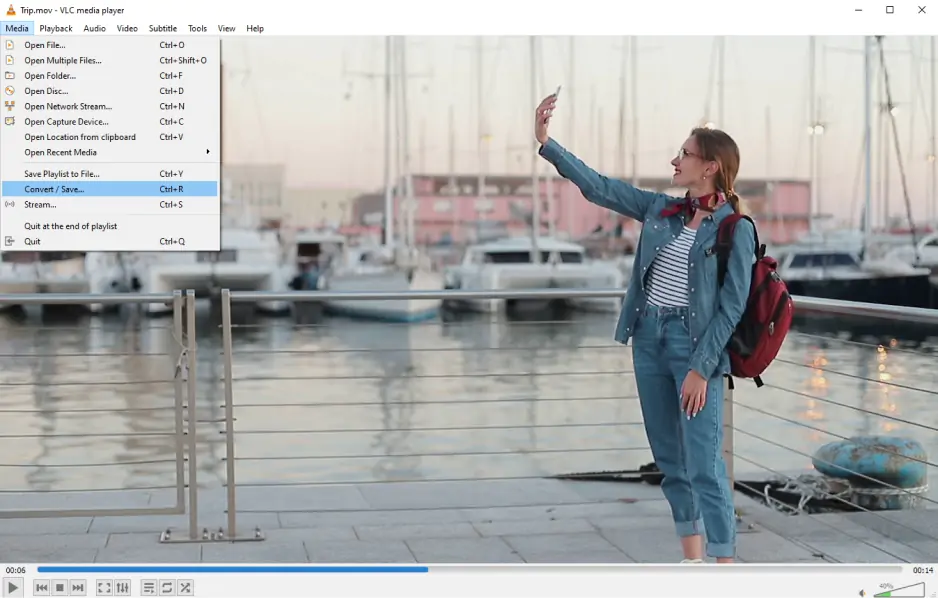
Why I picked it: I liked that a player I already use could also handle ripping and converting
OS: Windows, Mac, Linux
VLC is well-known as a versatile media player that offers a built-in conversion feature. No wonder it can also rip DVDs! With this open-source you can convert ISO images and VIDEO_TS folders to MP4 (or other video format, as VLC offers a wide array of output options). Setting up a conversion session can be challenging, but the result is worth it, and the process itself is pretty quick. Of course you can also use the basic video-editing tools to polish the resulting video. I’ve always liked VLC for playing just about anything, so I was curious about it as a MP4 to DVD converter. It worked better than I expected, though I didn’t love how clunky the setup felt. Still, for a free player doubling as a converter, it impressed me.
Completely free
Available in almost any language for almost any OS
Wide array of supported video formats
Conversions can be challenging to set up
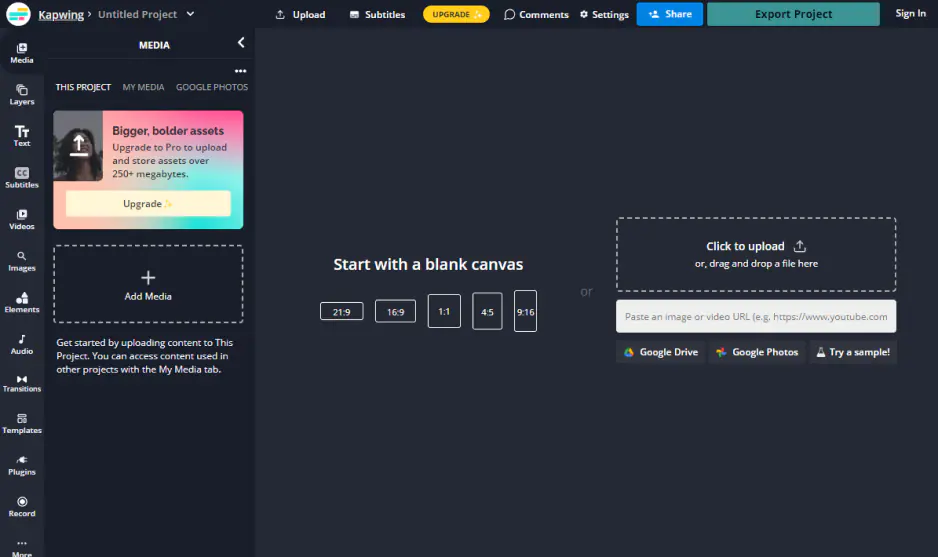
Why I picked it: I could just drag a file into the browser, hit convert, and move on with my day
OS: Any browser
I’ve used Kapwing before as a meme maker, so trying its online video converter felt like checking in on an old friend with new tricks. The process is dead simple: upload your file, pick the format, and let the tool do its thing in the cloud. It handled MP4s, MOVs, and even GIFs without breaking a sweat, and I didn’t have to download a single thing. What I liked most was that it doubled as an editor, so I could trim or resize before exporting – no bouncing between apps. The only catch is you need a stable connection, and some features are locked behind the paid plan.
Clean, modern interface
Works in the browser without downloads
Handy editing tools built in
Depends on internet speed
Free plan limits exports and adds a watermark
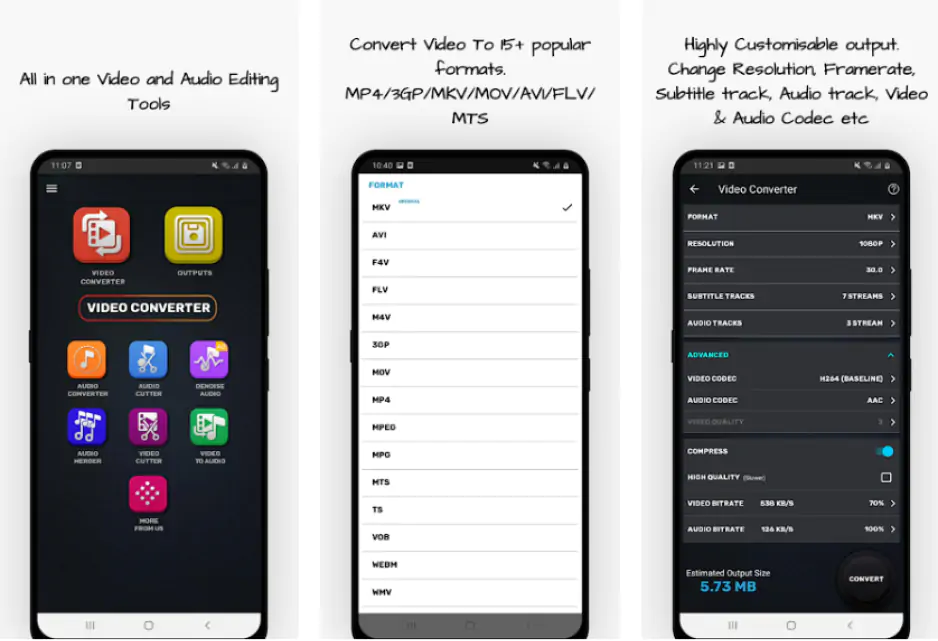
Why I picked it: It was perfect when I needed a quick fix on my phone without firing up my laptop
OS: Android
I put this video converter through its paces on my phone, and honestly, I was surprised by how capable it was for something so lightweight. I could switch videos into different formats, shrink big files so they were easier to share, and even pull out the audio without jumping through hoops. The layout felt simple enough that I didn’t need a guide to figure it out, which I appreciated. For quick conversions on the go, it got the job done without keeping me waiting. The downsides? The ads can get a little annoying, and I noticed it lagged when I threw really large files at it.
Easy to use
Supports a wide range of formats
Quick compression and audio extraction
Ads can get annoying
Not the best with very large files
Download Movavi Video Converter, open the file, and install the software on your PC or Mac.
Insert the disc into your computer’s DVD drive. Click Add Media, then Add DVD in the top left corner of the Video Converter window and choose Open DVD. Find the disc on your computer and click Select Folder.
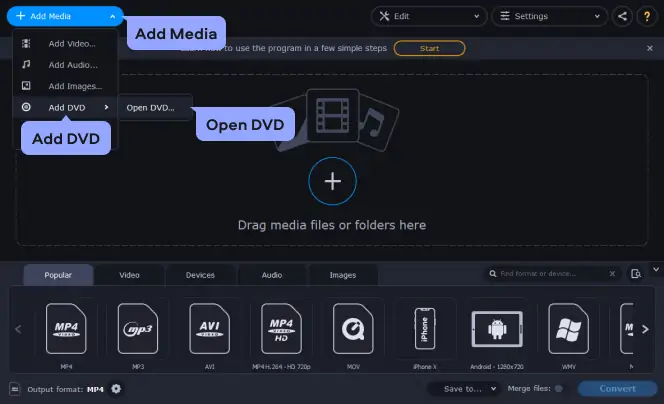
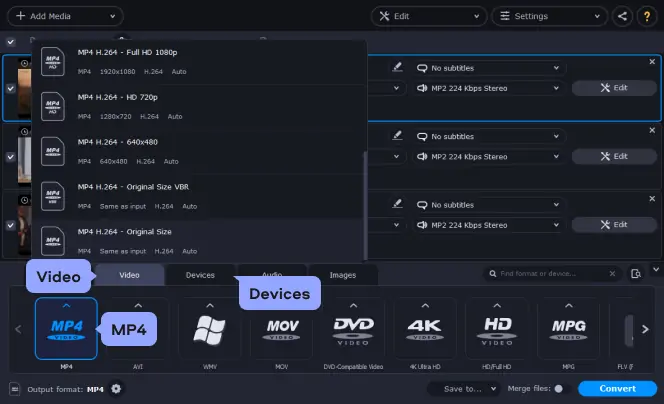
Choose the desired format for your converted DVD video under Video. Movavi Video Converter supports over 180 formats and codecs including MP4 (MPEG-4), AVI, MPG, HD video, and more. You can also save your movie in an appropriate format for playing on the mobile device of your choice, including iPad, iPod, Android phones and tablets, and many more – just check the Devices category to see the complete list.
Once you have selected the preset that suits you best, the program will estimate the size of the output video file so you can decide if it meets your quality and other requirements, or you can choose another format.
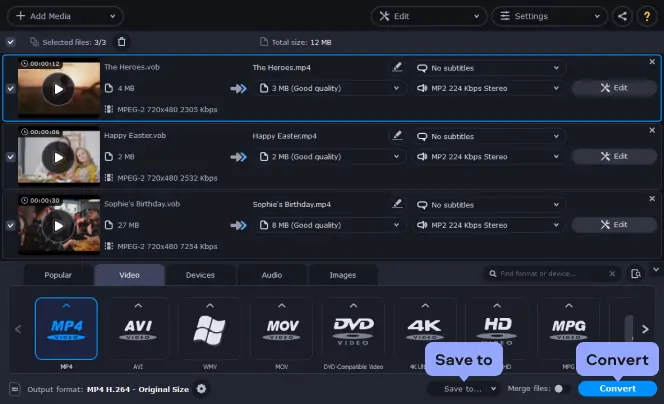
Click the Save to button to change the destination folder for the output file. Then click the Convert button in the bottom right corner and wait until the video is processed. Once the conversion is complete, the folder with your converted DVD videos will open automatically.
When it comes to DVD converters, I’ve learned that there’s no one-size-fits-all solution – it’s more about matching the tool to the way you actually use it. Some people just want presets that do the heavy lifting without needing a crash course in video formats, others want to tinker with every last bitrate and filter, and a few just want something that works quickly on the fly. After testing all of these, here’s how I’d break it down.
If you’re looking for something that feels professional but doesn’t overcomplicate things, Movavi Video Converter really stood out to me. It’s fast, reliable, and packed with extras, and I kept going back to it because it just works.
On the flip side, if you love having full control and don’t mind a learning curve, HandBrake is a solid pick. I could mess with everything from filters to frame rates, and even big, awkward files didn’t make it flinch. It’s not “plug and play,” but for control freaks, it’s the holy grail.
For anyone who just wants something approachable, Freemake is the friendliest of the bunch. I liked that I could trim, add subtitles (in the paid version), and even burn DVDs with menus without diving into confusing menus. The catch is the watermark in the free version – a reminder that nothing’s ever truly free.
If speed is your priority, especially with scratched or stubborn discs, WinX DVD Ripper Platinum surprised me with how fast it powered through. It’s not free, but if you’ve got a big library to back up, it might be worth the investment.
And for quick, casual jobs, the online and mobile options are surprisingly handy. Kapwing made it easy to drop a file in and convert it straight from the browser, and Video Converter, Compressor got me out of a pinch when I needed to shrink a file on my phone in a matter of minutes. They’re not built for bulk jobs, but for one-offs, they’re lifesavers.
The bottom line? The trick is knowing your own priorities. Once you do, the right choice pretty much picks itself.

Here’s what Movavi’s team does to provide you with verified information:
When selecting products to include in our reviews, we research both demand and popularity.
All the products covered in this article have been tested by our team.
When testing, we compare key characteristics, including supported input and output formats, quality loss when converting, and other significant features.
We study user reviews from popular review platforms and make use of this information when writing our product reviews.
We collect feedback from our users and analyze their opinions of Movavi software as well as products from other companies.
A DVD is an optical disc acting as a physical carrier of digital information. A DVD can store media content of all sorts. You are most likely to find .vob and .ifo files on your disc. Below we explain what .vob items are for.

You can convert a DVD to a digital copy using any of the programs in this article. Beware that it’s technically illegal to copy a DVD with copyrighted material, but if you are doing it for personal use, you are unlikely to get into trouble. If you’re concerned about the issue, we recommend consulting with local laws.
You may have just read the previous answer and be a little confused. Many people claim that it is perfectly legal to copy a DVD as long as you are using it as a personal backup and do not plan on redistributing it in any way. They argue that as the rightful owner of the DVD, you are entitled to a backup. Are they correct? No. At least not under US law. DVDs are protected by DRM (Digital Rights Management). Under Title I of the Digital Millennium Copyright Act, it is illegal to circumvent DRM. Because you must circumvent the DRM to make a copy, doing so is automatically unlawful. Things may change in the future, so again, always be sure to check current local laws before you copy a DVD to a PC.
Yes. VLC is a powerful media player that is popular because it can open many files that other players can't. It can easily open DVD files from their VIDEO_TS folders as well as the specific VOB video files that are stored on the DVD. Many people don't realize this, but VLC can also export any opened video to any supported format. This means that you'll be able to open your DVD in VLC and then rip it to MP4, AVI, FLV, MKV, MOV, or nearly any other format you can think of. This makes VLC a capable DVD player and converter. However, this conversion only comes as a side effect of the ability to export video. As a result, you won't find many editing features or advanced options for controlling the conversion of your DVD to other formats.
No, ripping a DVD is perfectly safe. It involves circumventing the copy protection the same way that any DVD player would do in order to playback the DVD. This means that unless there is some error with your DVD drive that would damage the disk while playing it, ripping it will not cause any harm.
Yes, you can. Both free and paid versions of Video Converter are capable of reading DVDs and make converting them to MP4 or many other formats easy to do. You can go to the website of this DVD converter for a free download of the full version so that you can compare the differences.
How to convert HD to MP4
How to convert DVDs for the iPod
How to convert video to the MKV format
How to rip DVD files
How to Convert Videos for Facebook Uploading
FLV vs. MP4: Video File Comparison – Movavi Video Converter
Convert MP4 to WMV Online for Free [Fast & Easy]
8 Best Ways to Convert MOV to MPEG [Online/Windows/Mac]
3 Ways to Compress Videos for Facebook [PC/Online/App]



1.5M+ users already subscribed to our newsletter