

Step 1. Install the video converter to MP4
Download our video to MP4 converter. Run the setup file and follow the installation instructions appearing on your screen.
Use this free tool to convert to MP4 online!
It works seamlessly on Windows, Mac, Android, and iOS.
The online video to MP4 converter lets you change the format of your video in just a few clicks. You can also use a desktop media converter from Movavi.
Ever tried to send a funny clip to a friend only to realize their device can’t play it? I know these situations all too well, and it usually comes down to the file format. That’s why I almost always change video to MP4 before sharing. The MP4 format is part of the MPEG-4 standard and works practically everywhere – from Windows PCs and Macs to smartphones, tablets, TVs, and even game consoles.
If you’re wondering how to convert a video to MP4, I’ve tested a bunch of methods. Online converters are quick for small files, but they choke on big movies. For larger projects, a solid desktop tool like Movavi Video Converter is a game-changer.
In this guide, I’ll show you the easiest way to change video to MP4, explain what makes MP4 so universal, and answer some of the questions I get most often.
If you're converting videos for social media platforms, it's a good idea to optimize the video size and format to match each platform’s requirements. For example, Instagram prefers square or vertical videos, while YouTube works best with widescreen formats. Paying attention to resolution and aspect ratio will ensure your video looks perfect when uploaded.
Movavi’s MP4 video converter has a powerful media processing tool that supports over 180 formats, including MP4, AVI, MOV, FLV, WMV, DVD, and many more! With Movavi Video Converter, you can change the format of your video files in just a couple of clicks. And don’t worry if you don’t know how to convert files to MP4 – with Movavi Video Converter, it’s very simple! No need for any special knowledge about media formats. Just run the software, open a film or video clip, select a ready-made preset, and convert your files. Check out our guide on how to convert a video to MP4 below for more detailed instructions.
Download our video to MP4 converter. Run the setup file and follow the installation instructions appearing on your screen.
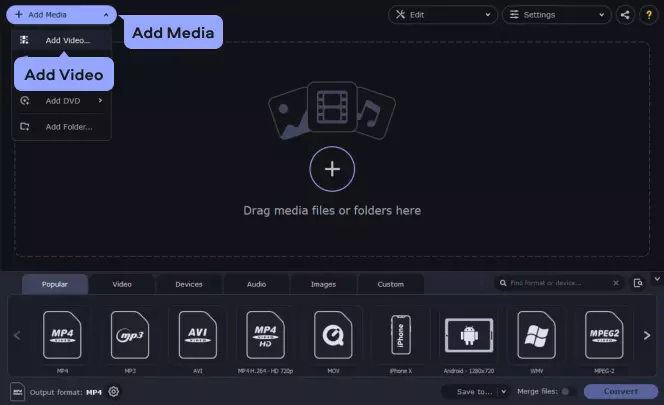
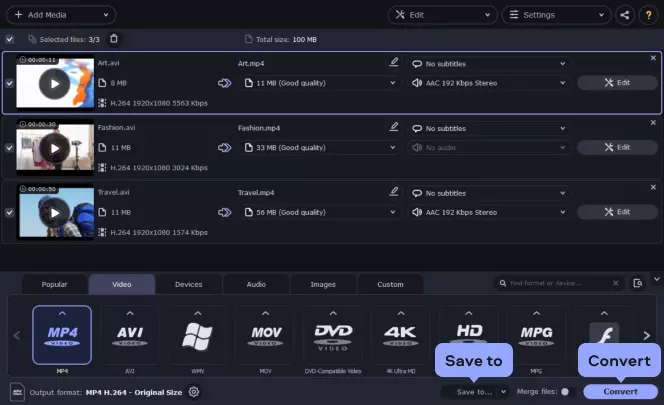
Run Movavi Video Converter and click the Add Media button. Select Add Video to import the video you want to convert to MP4.
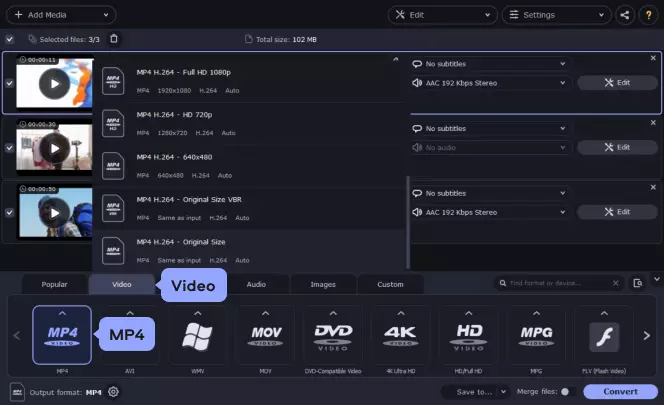
Open the Video tab at the bottom of the window. Here, you’ll find a list of supported formats. Expand the MP4 category and choose one of the MP4 presets that suits your needs best.
If you want to convert your video to MP4 for playback on a mobile device, open the Devices tab and select the device manufacturer and model from the list. To let the app determine the appropriate preset, simply connect your device to the computer and click the Cell Phone icon to the right of the search bar.
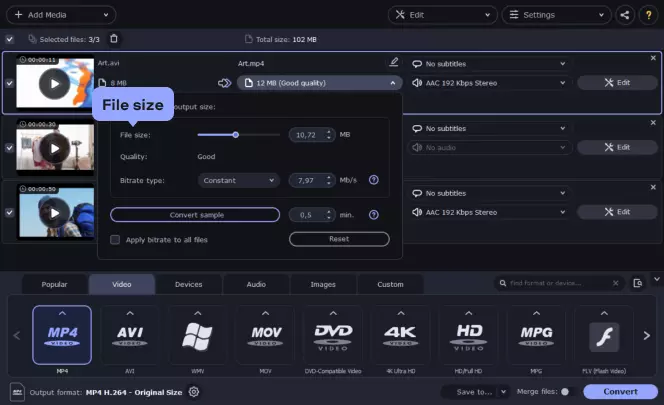
If the output file size is too large, you can compress the video. Click the file size value under the file name. Now move the File size slider to set the desired value and the program will adjust the video bitrate accordingly.
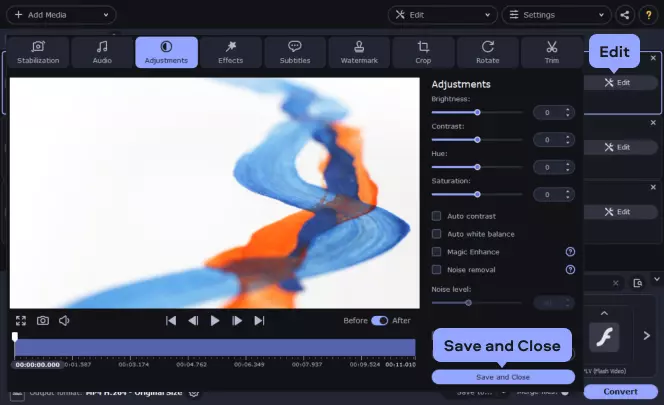
To open the editing window, hit the Edit button. Here you can trim, crop, or rotate your video. You can also add filters in the Effects tab or adjust the image manually using the tools in Adjustments. Click Apply to save the changes and hit Save and Close.
Click the Save to button and specify the folder in which the converted files should be saved.
Finally, click the Convert button. And that's all! The program will convert your file to MP4.
After your video files are converted, minimize or close the Movavi video decoder and connect your mobile device to the computer. Start the uploader on your device and follow the on-screen instructions or, depending on the device, open the appropriate folder on it and save the converted files there. Note: The uploading time will depend on how large your video files are.
That's all there is to it! Now you know how to convert videos to MP4 or convert your MP4 files to any other popular video format.
The converter is also a fast way to extract music from movies by converting the video files to MP3, AAC, FLAC, WMA, or another audio format.
Even if video conversion is your priority, pay attention to the audio, too. Some converters default to lower-quality audio to save space. Always double-check your audio settings to ensure you don’t accidentally lower your video sound quality during conversion.
MP4 is one of the most widely used formats today, thanks to the efficient video compression. Most devices are compatible with this format, and if you need to convert a video to MP4, you can do so directly from your mobile phone, using simple and fast applications, so you don't need a computer or many resources to do it.

Here’s what Movavi’s team does to provide you with verified information:
When selecting products to include in our reviews, we research both demand and popularity.
All the products covered in this article have been tested by our team.
When testing, we compare key characteristics, including supported input and output formats, quality loss when converting, and other significant features.
We study user reviews from popular review platforms and make use of this information when writing our product reviews.
We collect feedback from our users and analyze their opinions of Movavi software as well as products from other companies.

Think of a video to MP4 converter as your video’s passport. Regardless of whether you require a short, laugh-filled clip or an extended, feature-film, you can make it an MP4 in just a couple of minutes. For speedy, little projects, a web tool is the way to go: drop files in, choose MP4, hit convert, and download the result. If you're dealing with big files or something that took the course of a season, a native desktop app like Movavi Video Converter provides faster processing and plenty more control.
Switching formats is basically a tech wardrobe change. Fire up a trusty video converter to MP4 or whatever, put in your file, choose the output – MP4, AVI, MOV, you know the drill – and relax. Most converters even let you fiddle with resolution or codec settings prior to your click of Convert.
Need a quick video convert to MP4 when you're out the door? Open an internet-friendly web converter in Safari or any web browser, upload the video, select MP4, and download it back into your camera roll. When you have lots of files or need pro-level throughput, of course, you can always transfer the videos onto your computer and do the job with desktop software.
Absolutely. MP4 is a multimedia container designed to hold video, audio, and even subtitles in one neat file. It’s the go-to for streaming, sharing, and downloading because it keeps quality high while keeping size low.
Got an Apple MOV clip that won’t play nicely elsewhere? Drop it into a trusted video converter, choose MP4, and click Convert. In no time, you’ll have a universally compatible file. The same move works if you ever need to turn a song or any other audio-visual content into MP4 for smooth playback on practically any device.
Popular
How to convert 3GP to MP4
How to convert WMV files to AVI
How to convert FLV videos to MP4
How to convert MOV to MP3
How to convert MP4 to FLV
MP3 vs. MP4: Comparison
What is an MP4 file?
OGG to MP3 converter [online & free]
15 Best free video converters for a Mac [2026]
16 Best Video Encoder Software [Free Included]
Convert AVI to MP4 [Online & Free] – Movavi
16 Best MP4 to MP3 Converters in 2026 [Software & Apps]
How to Change Video Format | Video File Converter Online
Convert Video to MP3 Online for Free [Fast & Easy]
Convert MP3 to MP4 Online for Free – Movavi
Convert AVCHD to MP4 Online for Free – Movavi Video Converter
Convert MP4 to MPEG Online for Free – Movavi Video Converter
Convert MP4 Files Online for Free – Movavi
Convert M4V to MP4 Online for Free (Easy Tool) – Movavi
Convert MP4 to WebM Online for Free – Movavi



1.5M+ users already subscribed to our newsletter